

 Refresh
UI design for an iOS(iPhone) photo editing app
¿Quieres ganar un trabajo como este?
Este cliente recibió 38 diseños gráficos de 3 diseñadores. Eligieron este diseño gráfico de Valeria como el diseño ganador.
Únete gratis Encuentra trabajos de diseño
- Garantía
-
 US$430
-
 38 diseños
-
 3 diseñadores
Resumen de Diseño Gráfico
This design contest is to design the UI/screenshots of an iOS(iPhone) app named "True Colors". Some minor design details are left out at this point as the mockup is still in progress. The icon of this app will be designed separately. The winner of this job will be selected to work on a long term basis as an iPad version and several updates will have to be designed as well as the Android version. Please take
this as a long term opportunity.
The photo app is called "True Colors". The design need to dynamic, different that stands out WITH a serious and polished look.
All the mockups and sample screenshots are attached for ease. Please thoroughly review them.
This app has the following screens:
1. Welcome screen(just a simple background will do now as icon will be put later).
2. Main Screen (or LightBox)
The background of this screen can be the same as the background of the welcome screen. It can be a wooden background OR a background of your
choice that fits and blends in the buttons and fonts/colors.
The main screen has this bars/buttons/options that has separate screens:
On top, menu bar:
has these buttons
settings on the left(icon)
in the middle, 3 buttons (please check lightbox mockup and lightbox sample pics)
on the right, share icon(check share screen sample)
Our share options:
"Share" button screenshot:
Our share options:
Save
Email
Copy
Instagram
Facebook
Flickr
Twitter
in the middle, just background where the pictures would appear later after importing
or saving
at the bottom bar:
3 buttons:
Camera Roll(on the left)
Camera Button(middle)
Advanced Button(on the right)
2 versions of this screenshot need to be designed.
1. regular version with all the options
2. regular version plus the "steam effect" button showing up on top of the "Advanced" button(mockup with red lines)
3 separate screenshots need to be designed for the options"
settings screenshot(please check sample):
Gift True Colors to a friend
Rate/review in the App Store
(space in between...so they are grouped)
Geotagiing(on/off)
Captured photos get location-specific information(these lines in smaller fonts)
Launch in Capture Mode(on/off)
True Colors is automatically lauched in camera mode
Autosave to Camera Roll(on/off)
Captured photos are directly saved to camera roll
Reset All Tutorials
Tap to reset all the tutorials
In the "Steam Effect" screen, please check the mockup
Top Bar: lightbox button(to go back), heading and Done button
Middle: Steam background(provided)
Bottom bar:
refresh button
droplets(when clicked on/off options show up on top, please check mockup)
finger size(when clicked 3 options show up)
steam density(when clicked 3 options show up)
Please use the buttons for the droplets, finger size and steam density from the steam effects button image provided)
(and also the background of this screenshot(in the middle) would be a steam screen which is provided. Please use the
steam background provided and you need to use the background in the middle, just omit the top and the bottom bar from the image)
Now back to the main(lightbox screen):
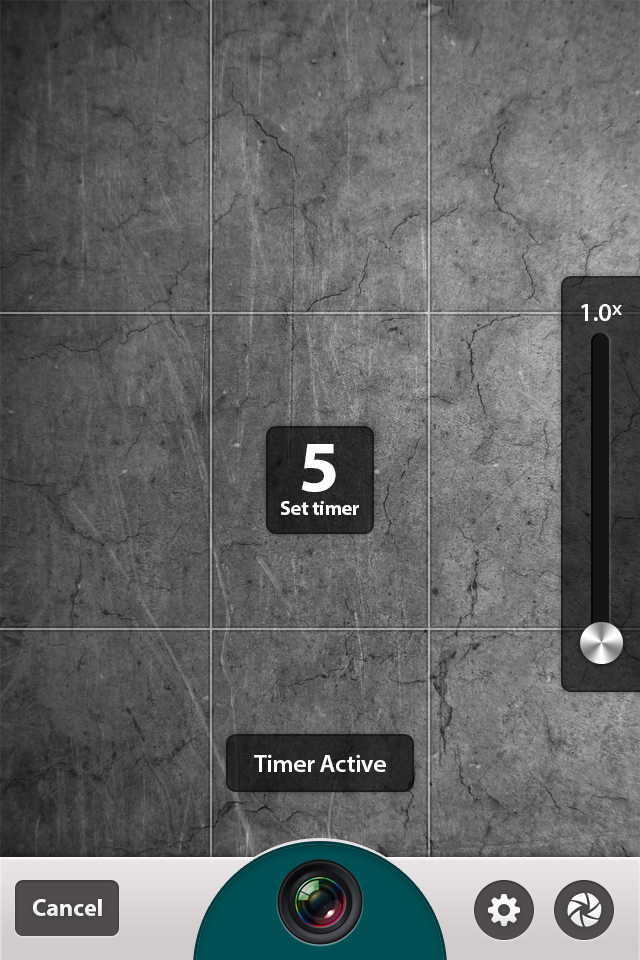
When Clicked on the "Camera" in the middle of the bottom bar, the capture mode screen shows up.
Please refer to the mockup first
There you will see the cancel button on the left
camera button in the middle
a small settings button on the right
and a filters button on the right
and the filters bar on the top
ours need to like this
please refer to capture mode sample 1
please refer to capture mode sample 2
please refer to capture mode sample 3
normal
Grid
timer(5/15/30 secs)
Edit Screen(check sample)
Edit options
Adjust:(displayed on a bar)
1. Left
2. Right
3. Horizontal
4. Vertical
5. Straightening
Crop:
None
Original
Golden
Freeform
Square
3:2
4:3
4:6
5:7
8:10
16:9
Filters:(please note that this filter icon and the filter icon in the "capture mode" screenshot need to same)
(the filters are displayed on a bar, please check sample)
There is a sample picture that you need to put in the picture of the filters. It would be same picture in
every filter at this point.
00.None
0.Calibrate
1. aurora
2. drizzle
3. icicle
4. blizzard
5. calm
6. dew
7. knot
8. dry
9. eye
10. flurry
11. fog
12. frost
13. hail
14. haze
15. heat
16. humid
17. overcast
18. polar
19. thermal
20. trace
Editing options on top:(check sample)
Brightness
Contrast
Saturation
Textures:(dispalyed on a bar, check sample)
1.None
2.Bark
3.Grunge1
4.Grunge2
5.grunge3
6.Grunge4
7.Paper
8.Cardboard
9.Wood
10.Bokeh
11.Bricks
12.Metal
13.Asphalt
14.Pavement1
15.Pavement2
16.Paint1
17.Paint2
18.Rust
19.Towel
20.Stone1
21.Stone2
22.Wall
23.Urban1
24.Urban2
25.Urban3
26.Watercolor
Tilt-shift/Vignette:(check sample)
Borders:(check samples, at this point, we are working on them, you just need to make a bar that displays them)
1.None
2.
3.
4.
5.
6.
7.
8.
9.
10.
11.
12.
13.
14.
15.
16.
This is our primary design mockup. Upon selecting the final version, we will be working on some more and minor details(as
we are also working with the coders).
And there is a folder callled "app sample". Please take a look at it and think how our app can be different and stand out.
Thanks and feel free to contact me anytime if you have any questions. Looking forward to hearing from you and building a long term
relationship.

Actualizaciones
Project Deadline Extended
Added Wednesday, May 29, 2013
Project Deadline Extended
Added Monday, June 03, 2013
Project Deadline Extended
Added Monday, June 10, 2013
Project Deadline Extended
Added Monday, June 17, 2013
Objetivo del mercado(s)
All camera app users who likes to edit their photos with cool tools.
Tipo de industria / entidad
Building
Mira y siente
Cada control deslizante ilustra las características de la marca del cliente y el estilo que debe comunicar el diseño de tu logotipo.