

 Refresh
Settings Menu Design
Ganador
¿Quieres ganar un trabajo como este?
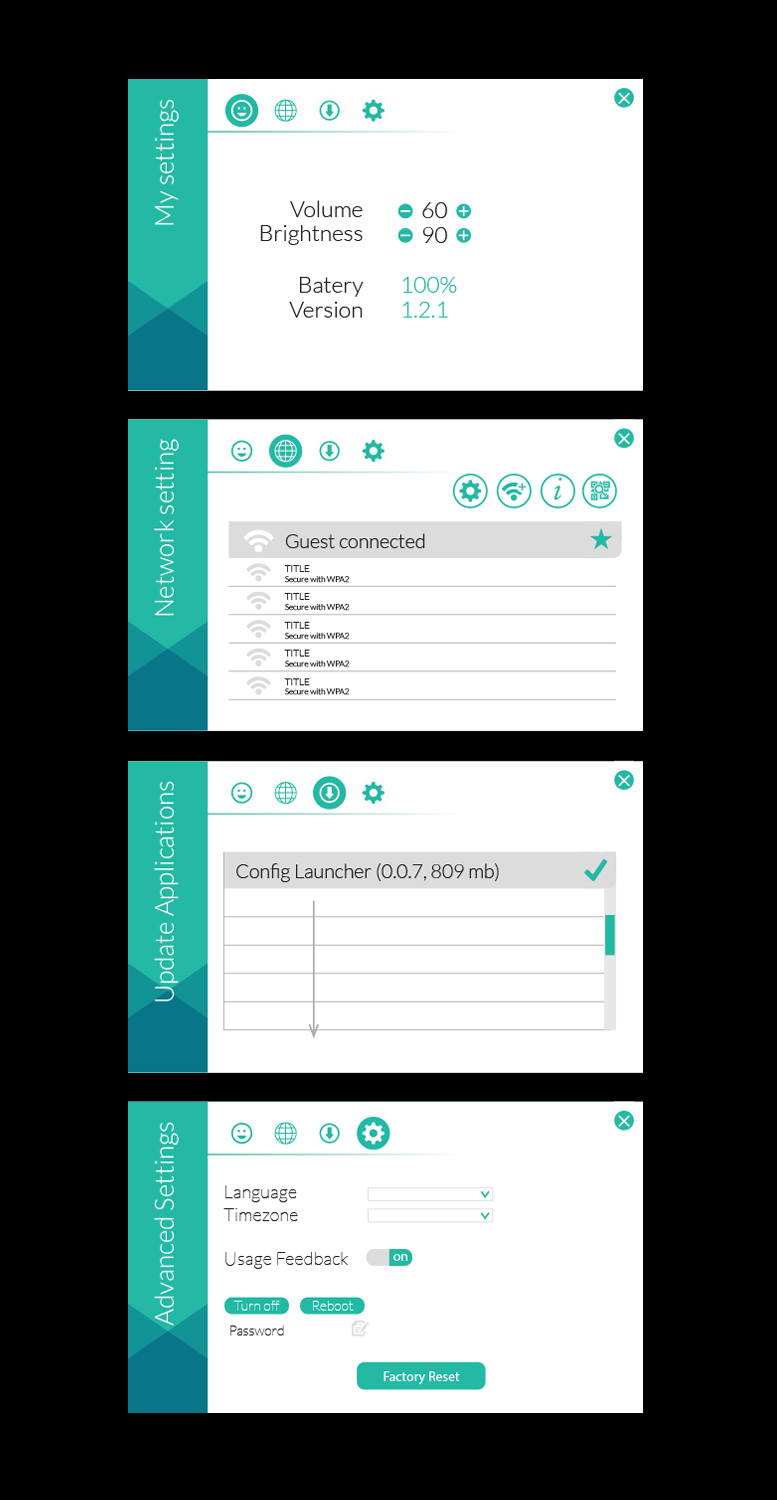
Este cliente recibió 32 diseños de menú de 4 diseñadores. Eligieron este diseño de menú de Priyo Subarkah como el diseño ganador.
Únete gratis Encuentra trabajos de diseño
-
 US$220
-
 32 diseños
-
 4 diseñadores
Resumen de Diseño de Menú
Need new conceptual designs for App Settings screen. Screen is to be used on Android device. Simple UX right now is great. Please see rough layouts attached.

Actualizaciones
Just want to thank everyone for submitting and working on this. Very appreciative as it's helped push the direction a little further for new revisions.
Added Thursday, September 14, 2017
Objetivo del mercado(s)
Business owners
Tipo de industria / entidad
Android
Estilos de fuente para usar

Sans serif
Colores
Colores seleccionados por el cliente para ser utilizados en el diseño del logotipo:
85cae6
3276b5
33b8a4
fbfbfb
dbdbdb
aaaaaa
Mira y siente
Cada control deslizante ilustra las características de la marca del cliente y el estilo que debe comunicar el diseño de tu logotipo.
Elegante
Atrevido
Juguetón
Serio
Tradicional
Moderno
Atractivo
Profesional
Femenino
Masculino
Vistoso
Conservador
Económico
De Alta Gama
Requisitos
Debes tener
- Need new conceptual designs for App Settings screen. App screen will need the following:
- 4 main buttons at the top of the screen. Should include an exit button at the top:
- 1) Main Settings screen - when the user comes to settings home the following are visible: Brightness and Volume need to be interactive to adjust. Battery % needs to be visible. Versioning needs to be visible on-screen as well.
- 2) Network Settings - This has an additional 4 buttons to highlight:
- 1 - A Refresh button. A Column for IP address for a user to interact with and select. Show selected network with an icon. Maybe a star?
- 2 - Wifi Advance - settings to show: Country Code drop down button, SSID section to enter info. Security selection: None, Active. And check box or equivalent to Advanced Options button.
- 3 - Address of device: Ethternet info: _____, Wi-Fi: _____, Tablet: _____
- 4 - QR Code scanner. Tablet will activate front facing the camera and show a live image of what's in front. Needs to read: "Please hold your QR Code in front of me." - Show window of image and section for Country Code drop-down menu.
- 3) Update Applications Section - Showing latest configs and updates with the size of the update. i.e. Config Launcher (0.0.1, 809 mb) - then show item installed, indicated by a checkmark.
- 4) Advanced Settings Screen - Select language ( could be a drop-down menu), Select TimeZone, a button for Usage Feedback, Turn off button, Reboot button, password section that is editable.
- Looking for Clean, flat shaped UI design. Soft drop shadows okay.
- Layout: 1280x800
No debería tener
- No beveled or embossed edges. No gloss or glass looking buttons.
Archivos
Descargar todos los archivos - 0,3 MBPNG
SettingsMenu_1 Tuesday, 05 September 2017 21:01:10

martes, 5 de septiembre de 2017
PNG
SettingsMenu_3 Tuesday, 05 September 2017 21:01:10

martes, 5 de septiembre de 2017
PNG
SettingsMenu_2 Tuesday, 05 September 2017 21:01:10

martes, 5 de septiembre de 2017
PNG
SettingsMenu_4 Tuesday, 05 September 2017 21:01:10

martes, 5 de septiembre de 2017
Pagos
1er lugar
US$90
2do lugar
US$100
Pagos de participación x 3
US$10