

 Refresh
UI design for Fast Food Restaurant Self-Order App
¿Quieres ganar un trabajo como este?
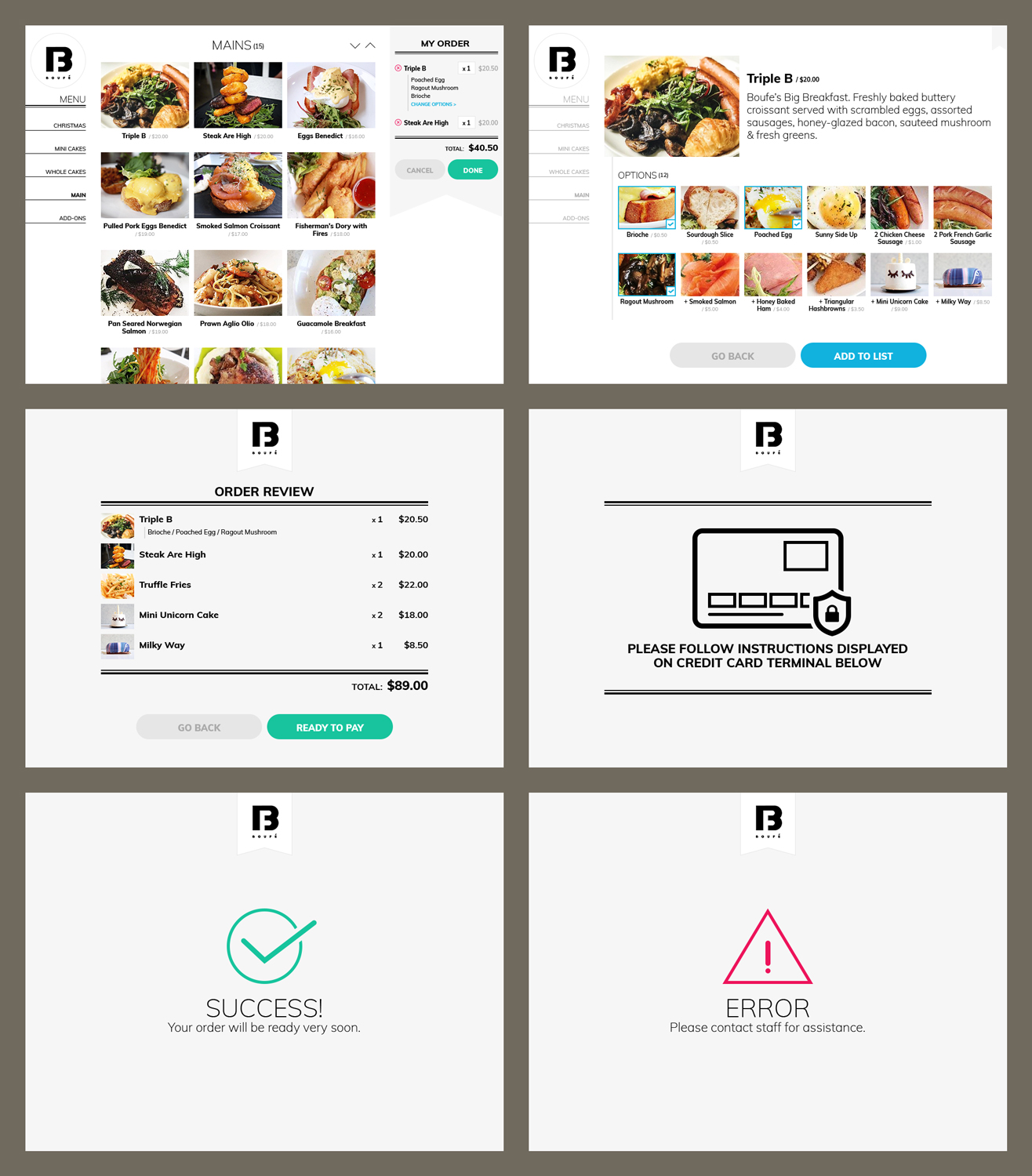
Este cliente recibió 36 diseños de app de 10 diseñadores. Eligieron este diseño de aplicación (App) de MIND como el diseño ganador.
Únete gratis Encuentra trabajos de diseño
- Garantía
-
 S$460
S$460
-
 36 diseños
-
 10 diseñadores
Resumen de Diseño de aplicación (App)
Background:
App purpose: for fast food restaurant customers to self order food/drink by choosing item image, and make payment by tapping the credit card on the card terminal.
Reference: https://www.nextepsystems.com/product-overview/self-order-kiosks/
Attachment:
Wireframes. (wire frames provide general idea and the information to display, they are not a strict guideline for layout design.)
Mcdonald's Self ordering app.
Intro:
We have built a (for restaurant and cafe) Self Ordering and Payment app, similar to Mcdonald's self ordering software in most of their new restaurants. Our app will be placed in a Microsoft Windows 10 OS touch screen Kiosk(screen size 4:3 or Portrait 16:9) within the restaurant/cafe premise.
Pages to be designed:
Page 1. Food Browsing Page. displays all food images(to be provided by cafes) by categories, and displays the Cart. This page will lead to Page 2 or Page 3.
'Cart' section should include:
'cart items/selected items', its quantity and price. like Mcdonalds' app.
When click on a Cart Item, we need to allow to change quantity or 'change Choice'. The UI handling these change requests with ease will be one deciding factor for us to choose your design.
Fact: up to 10 food categories, and 10 - 25 food items under each categories.
When click on one item image, it goes to Page 2.
Page 2. Item Detail/Description Page. Shows description of the food, and its available Choice(other food items or Special Request, up to 12) will also be displayed. 'Add item to cart' action(Button Name: ADD) will happen here and go back to Browsing Page 1.
e.g. Item 'Fried Rice' Page. the Choice could be 'Add Egg', 'Add Meat', 'No Chilli' etc.
Page 3. Order Review Page. No edit features allowed on this page, only two buttons: 'No' to go back to Browsing Page, or 'Yes' to proceed to Payment Page 4. Check Mcdonald's screen.
Page 4. Payment Page - Prompt user to Insert or Tap credit card on the credit card terminal. (Exact wording: PLEASE FOLLOW INSTRUCTIONS DISPLAYED ON CREDIT CARD TERMINAL BELOW)
Page 5. Payment status. Successful / Failed.
Our considerations to pick the winner:
1. In terms of design for this task, we look out for page layout, effects, fonts, button style and overall colour scheme. the design should present itself in a clean and modern look, with minimum clicking or scrolling. The app aims to help customers choose and pay for their items quickly.
2.we need to handle both 4:3(as shown in wire frames) and 16:9 screens(like Mcdonald's). there will be a lot more vertical space to utilise when it is in 16:9, resulting less scrolling than 4:3. tell us what you think.
All questions are welcome.
Winner has opportunity to work on a few more app UI. Cheers!
Tipo de industria / entidad
Fast Food Restaurant
Estilos de fuente para usar

Mira y siente
Cada control deslizante ilustra las características de la marca del cliente y el estilo que debe comunicar el diseño de tu logotipo.
Elegante
Atrevido
Juguetón
Serio
Tradicional
Moderno
Atractivo
Profesional
Femenino
Masculino
Vistoso
Conservador
Económico
De Alta Gama
Requisitos
Debes tener
- Button colour differentiation - helps people know what to click next.
- best use of screen space. minimum click and scrolls.
Agradable de tener
- any personal touch.
No debería tener
- unrelated design pattern, e.g. a cute animal or flower pattern in the layout.


